Devicescape Easy Wi-Fi v4.1.17 S60v5 SymbianOS9.4 Signed -High Bandwidth Browsing

Devicescape Easy Wi-Fi v4.1.17 S60v5 SymbianOS9.4 Signed


Enjoy easy high bandwidth web browsing and email access anywhere you go. Easy WiFi is an application which you install on your device which gives you free access to the world's largest WiFi network: the Easy WiFi Network.
The application gives you these major capabilities:
* A map to find hotspot locations you can really use, classified by capability
* Automated login when you're at a hotspot - no browsers to login
* Free access to the huge, global Easy WiFi Network
* Ability to extend your coverage by adding your own hotspot Private Networks accounts!
* Integrated Maps (5th Ed Only)
At last, finding, connecting, and global access all in one application. And it's FREE!
Easy WiFi hides the complexity of connecting to WiFi on Nokia S60 devices. Select the Easy WiFi IAP and the connection to any of your hotspots will be automated. S60 5th Edition devices get the Easy WiFi integrated map to find locations. 3rd Edition users can use the online map at easywifi.com to find locations.
Version 4.0 of Easy WiFi introduces the Easy WiFi Network, a global network of
reliable and free Wi-Fi access. The Easy WiFi user interface shows a map of all
locations where you can get access to Wi-Fi, including the Easy WiFi network, any
paid networks that you have accounts for, and optionally Wi-Fi networks that you
don t have immediate access to but could pay for using a credit card or room number
at the location. When you have Easy WiFi running on your handset, you have access
to the Easy WiFi network.SignUP Here
          Download Here
          http://www.ziddu.com/download/8925876/EasyWiFi_S60_4_1_17.rar.html


READ MORE - Devicescape Easy Wi-Fi v4.1.17 S60v5 SymbianOS9.4 Signed -High Bandwidth Browsing

Adobe FlashLite 3.1(4) S60v5 SymbianOS9.4 Signed


New version of Adobe Flash Lite

Changes in the new version:

- Support of H.264 standard
- Improved web browsing, 91% of the 500 best websites.
- Flash 9 (AS2 only) support
- Local Connection / HTML Text / GetURL_target / CSS support / WMode
- Support for hardware acceleration
- Flash Lite 3.1.4 supports OpenVG 1.1 to Improve flash performance on rendering capable devices.
- Improved memory handling for images
- MP3 Streaming support

http://www.ziddu.com/download/8953427/flashlite.joewana.rar.html
special credit to Raju fm India  keep share broda

READ MORE - Adobe FlashLite 3.1(4) S60v5 SymbianOS9.4 Signed

Membuat tube anda lebih cepat akses menu ke menunya

(Place the current date in the phone on the 01.05.2005.)
The first two tasks must be created. This is done with the following menu:
>Options
>New entry
>To Do Note
Create the following two tasks in the following order:
1.Task
*Subject: Speed
* Due Date: 04.08.2005
*Priority: High
2.Task
*Subject: Qoukie
*Due Date: 04.08.2005
*Priority: Low
Confirm with OK both To Do Note.The calendar does not close before!
Choose now the task of view on the following menu:
*Options
*Open
Set Speed first, followed by Qoukie menu is done:
*Options
*Mark as done
Under this approach, you can close the calendar and the current date back correctly.
From now should speed the navigation menu significantly increase. Also, the gallery should now be a performance boost get.
After a reboot or reset the phone, the effect is lost.After the switch, everything has to be repeated
comment: gw sih berasa ada banyak banget perbedaanya ke tube gw.
Kredit:kaskus
READ MORE - Membuat tube anda lebih cepat akses menu ke menunya

Dayhand Keyboard – Alternative text input for Symbian^1

1. Since the first S60 5th Edition (now Symbian^1) smartphone, the 5800 until now, the text input mechanism is something that I really hate.
2. There are 4 options, namely :
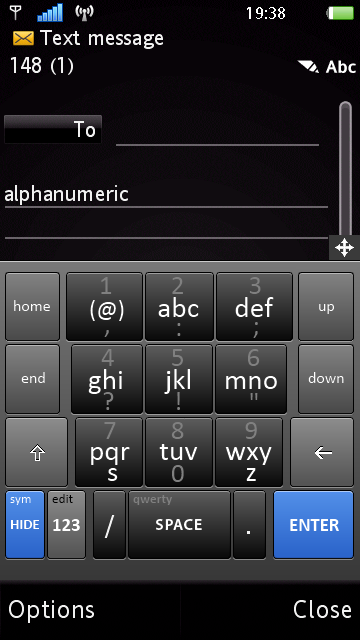
- alphanumeric keypad. for one hand usage but it requires a tap on the green tick icon on the top left after typing text… why cant it be placed on other places? such as the bottom of the screen?
- mini qwerty (portrait)
- big qwerty (landscape)
- handwriting recognition
3. The problem for all these text input options (except for the mini QWERTY and HWR) is they are not direct text input. You cant type and see the text entry box at the same time because the text entry window is separated from the text entry box. Why do the typed text box have to be included?
4. And the mini QWERTY is too small to use for someone with big thumb.
5. Using the alphanumeric keypad is even non-productive because there are too many “procedures” to do something as simple as typing a text message, for example.
6. You need to select write new message, the message editor will pop out. Click on the empty area, the alphanumeric text entry window will appear. Then you need to type the text, after that you need to tap the green tick icon on the top left, after that, send SMS. Phew…
7. I hate it and I feel it’s too much… Hence, I need to get an alternative.
8. And I found Dayhand text entry which solves almost all my text entry problems.

Keyboard Menu DayHandInput QWERTY in Portrait

9. It gives me a bigger QWERTY keyboard, with many options including an alphanumeric keypad (that doesn’t eat all the screen’s space), smiley keypad (yesss!!!), an editing keypad and more.

Alphanumeric Keypad DayHandInput numeric in Portrait

10. It even has a predictive mode which can be activated easily.

Tap and drag Tap and drag
11. However, the most interesting in terms of usability and it’s excellent design is the tap and drag to select the alternative alphabet / mode. For example, tap on the letter “d” and drag it up, it will print “+“. Very convenient ;-)
12. Thumb-typing is easy using Dayhand keyboard. I haven’t found any problem using it. Ah… and the landscape qwerty is a joy to use! HUGE alphabet keys!

landscape keyboard
13. I can type faster and more convenient using this alternative method.
14. Please Symbian… Make a better text entry method in future Symbian releases…
15. If you are interested to use Dayhand keyboard, the files are available in our download section. They need to be signed or you need to hack your phone to install them.

note:
* This is a modified version done by Mr. Milk. His words “This is the result of a personal effort to bring something good and free for the community. I’m not the application developer and have no way to change its core functionalities
Cheers!

credit: i-symbian
          Dayhand
READ MORE - Dayhand Keyboard – Alternative text input for Symbian^1