Logo Resmi HUT RI ke 72 Tahun 2017


Menjelang bulan Agustus ada satu perayaan yang cukup menyita perhatian kita. Perayaan hari Kemerdekaan Republik Indonesia yang jatuh pada hari kamis, 17 Agustus 2017 akan menjadi hari dimana kita mengenang jasa para pahlawan yang berjaung dengan rela mengorbankan jiwa dan raganya untuk Kemerdekaan RI.
Perayaan ulang tahun Kemerdekaan Indonesia tidak hanya satu hari pada tanggal 17 tetapi bisa kita lihat satu bulan penuh pada bulan agustus. Ada beberapa perusahaan yang sudah memulai perlombaan perayaan pada minggu minggu ini seperti Pertandingan Futsal. Dengan mulai pertandingan dibulan juli maka pada tanggal 17 agustus sudah memasuki babak Final.
Seperti judulnya bahwa yang kami bahas kali ini adalah logo resmi Peringatan HUT RI ke 72. Dimana perayaan kemerdekaan pasti membuat Logo Ulang Tahun yang setiap tahunnya berbeda beda dan memiliki makda yang berbeda juga.

Logo resmi HUT RI ke 72 tahun 2017


Arti logo resmi HUT RI ke 72 tahun 2017

Logo “72 Tahun Indonesia Kerja Bersama” menjadi representasi semangat gotong royong untuk membangun Indonesia menuju masa depan yang lebih baik.
Angka “7” pada logo menjadi simbol anak panah yang menyerong ke kanan atas. Ini melambangkan dinamisme pembangunan yang berorientasi ke masa depan positif.
Letak dan posisi angka “2” pada logo yang terlihat merangkul angka “7” lambang asas kebersamaan dalam bekerja membangun bangsa Indonesia dan mencapai target yang telah direncanakan.
Bentuk angka “2” juga merepresentasikan bentuk bendera Indonesia yang terdiri dari dua bagian. Sementara itu, slogan yang digunakan “Kerja Bersama, Bersama Kerja”.
“Kerja bersama” menunjukkan pendekatan yang bersifat merangkul dan memperlihatkan asas kebersamaan dan gotong royong dalam membangun Indonesia menjadi lebih baik.
Sedangkan “Bersama kerja” menunjukkan ajakan untuk bersama-sama bekerja membangun kemajuan Indonesia dan mencapai target yang telah direncanakan.
Logo tersebut bisa anda gunakan untuk membuat sebuah Banner, spanduk, poster ataupun logo pengumuman Perayaan HUT RI ke 72. Tidak afdol jika tidak melampirkan atau menyertakan logo resminya karena ciri khas dari perayaan kita pada tahun ini adalah menggunakan logo resmi yang dikeluarkan oleh setneg.go.id.
Akhir kata Merdekaaaa
READ MORE - Logo Resmi HUT RI ke 72 Tahun 2017

Harga Paket IndiHome Terbaru Agustus 2016


IndiHome Fiber adalah layanan Triple Play dari Telkom yang terdiri dari Internet Fiber atau High Speed Internet (Internet Cepat), Interactive TV (UseeTV) dan Phone (Telepon Rumah) atau bisa dibilang Paket Indihome adalah paket lengkapnya telkom. Dengan satu tagihan pelanggan dapat menikmati 3 layanan sekaligus yaitu berinternet, tv dan juga nelpon.Denger-denger selain ketiga benefit tadi ternyata pelanggan baru IndiHome yang berlangganan paket 10Mbps keatas akan mendapatkan bonus promosi berupa nonton bioskop gratis yang diberikan berupa IMC (Indihome Movie Card) gratis yang dapat digunakan untuk nonton film-film seru Box Office di Cinema 21, Cinema XXI dan The Premier dengan nilai saldo perdana sebesar Rp. 150.000. Namun syaratnya, pelanggan baru tersebut harus bertransaksi melalui web indihome.co.id, nelpon ke 147 dan Plasa Telkom selain itu gak dapet ya.
Apasih kelebihan Indihome dibanding Paket Internet Speedy biasa?
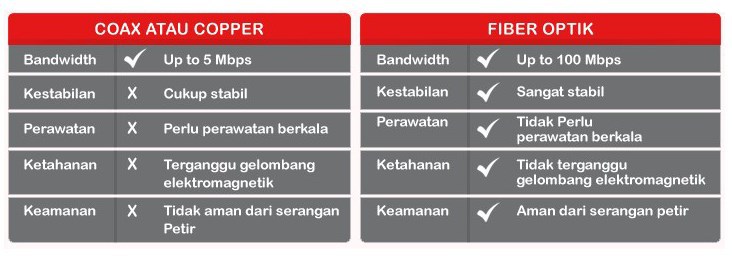
Selain 3 layanan dalam satu paket, kelebihan lain dari Indihome adalah kecepatan internet supercepat hingga 100 Mbps dengan harga yang sangat terjangkau bila dibandingkan dengan Paket Internet Speedy biasa yang masih menggunakan kabel tembaga. Selain itu paket Indihome diklaim lebih stabil karena menggunakan fiber optic yang sudah banyak dikenal karena kekuatan, kecepatan dan juga jarang sekali mengalami gangguan bila dibandingkan dengan kabel tembaga. Selain cepat dan jarang mengalami gangguan, Fiber Optik juga lebih minim perawatan berkala tidak seperti kabel tembaga. Selengkapnya dapat dilihat di gambar dibawah ini.

Selain Kelebihan ternyata dengan memasang Indiehome pelanggan juga akan banyak sekali keuntungan seperti:
  1. Gratis Nelpon Lokal Maupun Interlokal hingga 1000 menit
  2. 87 Channels (79 Channels SD dan 8 Channels HD)
  3. Satu-satunya TV yang bisa Playback 7 hari
  4. Keuntungan lainnya : Video Recorder, Video on Demand, Pause and Rewind dan Karaoke
  5. Menyajikan TV dengan kualitas yang prima dari segi gambar maupun interaktivitas
  6. Nikmati Channel Bein 1, Bein 2, Bein 3 hingga Juni 2016.
  7. Dan tidak lupa kecepatan Internet yang super cepat
Wuuuuuu banyak ya kelebihannya, jika anda adlah pelanggan paket internet speedy saya sarankan segera beralih ke Indiehome, dan seperti layaknya speedy, layanan dalam paket internet Indihome juga ada beberapa pilihan paket seperti paket 10Mbps hingga 100Mbps nah lebih lengkapnya ada pada tabel paket Indihome dibawah ini:

Daftar paket Indiehome diatas juga masih bisa kita klasifikasikan sesuai kebutuhan kita, seperti paket 10-20Mbps yang sesuai bagi Anda yang menggunakan aplikasi streaming video dan koneksi untuk game online secara masif. Paket 30-40Mbps Sesuai bagi Anda yang sering kali memanfaatkan aplikasi video kualitas HD baik streaming maupun surveillance. Serta Paket 50-100Mbps yang mampu menjalankan aplikasi video kualitas HD dan video conference, tetapi juga aplikasi bisnis skala menengah. Lantas mana paket yang sesuai dengan kebutuhan anda?
Jika sudah tahu paket Indihome yang sesuai, kini kita lihat daftar harga Paket Indihome beserta tarif indihome bulanan, nah berikut adalah harga Indihome:
Paket Indihome Harga
10Mbps 405,000
20Mbps 660,000
30Mbps 935,000
40Mbps 1,210,000
50Mbps 1,410,000
100Mbps 1,660,000
Atau Lebih jelasnya bisa lihat keterangan di gambar harga Indihome Paket berikut:

Dan sekarang anda pasti bertanya-tanya bagaimana cara pasang paket Indihome dari telkom ini bukan, nah cara daftar paket Indihome sebenarnya sangat mudah, anda dapat masuk ke Website resmi yang disediakan khusus untuk pendaftaran pelanggan telkom indihome baru di reg.indihome.co.id atau di line telpon 147 dan bisa juga langsung datang ke Plasa telkom terdekat. Kalo saya sendiri lebih memilih via website atau 147 ketimbang ke plasa, karena menurut pengalaman, pelayanan lebih cepat jika langsung menghubungi 147 atau website resminya. Selamat berlangganan dan semoga bermanfaat.
READ MORE - Harga Paket IndiHome Terbaru Agustus 2016

Logo Resmi HUT RI

Tiap tanggal 17 Agustus bangsa Indonesia merayakan Hari Ulang Tahun Kemerdekaan Republik Indonesia (HUT RI). Tiap tahun logo resmi HUT RI berubah
Mungkin ada yang butuh buat bikin banner
Logo HUT RI tahun 2016 ini atau HUT Ke-71 RI sudah dirilis dan filenya bisa didownload di situs resmi pemerintah.

Logo Peringatan Hari Ulang Tahun (HUT) ke-71 Kemerdekaan Republik Indonesia secara resmi dirilis pemerintah melalui Kementerian Sekretariat Negara (Kemensetneg).
Rilis logo 71 Tahun Indonesia Merdeka secara resmi tertuang dalam surat Sekretaris Kementerian Sekretariat Negara yang ditandatangani Sekretaris Setneg Setya Utama tanggal 25 Mei 2016.
Kita bisa mengakses dan mendownload logo resmi HUT RI tersebut di http://www.setneg.go.id. Link download lengkapnya –file JPG dan file CorelDraw– ada di bawah posting ini.

Makna Logo HUT Ke-71 RI

Di laman psmk.kemdikbud.go.id disebutkan, Logo HUT ke-71 RI mempunyai konsep bentuk kerja nyata yang berkesinambungan. Karena itu, visual 71 tahun Indonesia Merdeka memiliki bentuk yang berkelanjutan dari logo 70 Tahun Indonesia Merdeka.
Pada logo 71 tahun ini digambarkan dua setengah lingkaran yang mengilustrasikan bilah baling-baling yang dinamis selalu berputar mendorong pesat ke depan. Hal ini menunjukan komitmen pemerintah untuk kerja nyata dalam memajukan Indonesia.
Angka satu yang menembus bidang lingkaran mengarah ke kanan atas merupakan ajakan bagi seluruh lapisan masyarakat agar ber-“satu”, bahu membahu bekerja menembus segala rintangan.

Link Download Logo Resmi HUT Ke-71 RI 2016

1. Gambar Logo JPG: Link Download LOGO HUT R1 2016
 
credit : mbah sonto
READ MORE - Logo Resmi HUT RI

Kalender Jawa Online

Buat temen temen yang membutuhkan kalender jawa online, kali ini admin membagikan tool kalender komplit dengan pasaran jawa dan juga ilengkapi dengan tanggalan Hijriah
Semoga bisa berguna terutama buat yang lagi di Luar Negeri.
Jangan sampai kelewatan malam Jumat Kliwonya buat semedi 
 
silahkan dipake  DISINI
READ MORE - Kalender Jawa Online

ssh gratis 11 Aguatus 2014

ssh gratis 11 Aguatus 2014
Fitur:
Dropbear Port: 443
OpenSSH Port : 22,80,143
Account will expire on 13-August-2014
silahkan download lewat link dibawah untuk akun ssh nya
ssh UK
http://www.tusfiles.net/zf2mgxeayfrq 
ssh US
http://www.tusfiles.net/hh2ws3e2mlfr
 ssh premium
http://www.tusfiles.net/obo3r3wm0mo9

Gunakan Dengan Bijak 
READ MORE - ssh gratis 11 Aguatus 2014

Create Thousands of Twitter Accounts With a Single Email


Do you believe the title of this thread?
OK Immediately get into the subject without a lot of strings attached ..

things that need to be prepared before making that is one Gmail account 'Not Email Yahoo'
How to make a lot of fairly simple twitter account Signing Up is currently on the email column nda just add a + sign Keyword

First example:
For example, your email "pembisnis@gmail.com" then when registering you must add the + sign and the keyword behind word pembisnis
The result will be a "businessman sukasuka@gmail.com + 'keyword' sukasuka 'you can replace with any word including numbers may also be

Second example:
For example, your email is "pembisnis@gmail.com" then you can add a dot between words pembisnis
The result will be a "p.embisnis @ gmail.com"

But remember, do not occasionally make clones twitter account with the original email that you've registered on twitter!

If anyone has any questions "why is that?"
The answer: Because Twitter  assume that the + sign at the email or gmail dot means nothing but to gmail without a point and the + sign has no meaning, so that all email notifications of clones that you make will go to the original email

This method also applies to other social networking to create an account
READ MORE - Create Thousands of Twitter Accounts With a Single Email

Simple Bot Twitter

Ok now da tutor will will discuss about twitter bot
The following steps
- first you must have/own Facebook Status Bot (kindly googling for source code)
- run your status bot every 1 hour  or arrange as you like
- then login into your facebook account
- on da other tab login into your twitter account too
- click Setting-Follower-Twitter ( edit and linked your fb with twitter) 
- save and done :)

enjoy your bot :P
READ MORE - Simple Bot Twitter

How To Get Acces Token Non Expired

One of the most frequently asked for “How-To” requests from developers is how to handle invalid access tokens. Access tokens for users can become invalid due to various reasons. In most cases, they can expire if it’s past the time specified by the ‘expires’ field (by default access token have a 2 hour lifetime). What many developers do not realize is that an access token can also expire if a user changes her password, logs out or if she de-authorizes the app via the App Dashboard. It is very important that your apps handle such situations. If your access token expires, you need to reacquire a valid access token.
This post will walk you through how you can ensure that you are handling and recovering from these situations gracefully.
first step 
copy and paste code below on your addes bar (note: login into your fb acount before )
you will seen blank page and bad eror ..but dont panic :) follow next step
just clik back page menu on your browser (tested with FireFox)
Look your addres bar seem below
 
Now you've got your token..got luck buddy ..enjoy your BOT :P


READ MORE - How To Get Acces Token Non Expired

Make WhatsApp Free For Lifetime


As every knows Whatsapp is Fastest Growing Messenger for Mobile Phones. Whatsapp is highly downloadable mobile application. Every person who use internet on mobile always use Whatsapp, instead of doing sms from number to everyone because sms needs to activate costly packs which offers limited messages but Whatsapp allow to send unlimited messages with better interface and inbuilt number of amazing features like sharing images, videos, audios or other files as you want.
But the Major Problem with Whatsapp is that, its free subscription is just for one year. Means due to program policies of Whatsapp you can use it free for 1 year for every new installation. Then after completing 1st year you have to pay $0.99 to activate Whatsapp for next year. So here i will try to introduce amazing trick about making Whatsapp free after completing 1 year.

Note:- I know $0.99 is little bit amount and everyone can easily afford. So if your are not interested to due to do this then Just suggest you read it for fun because our aim is to increase your knowledge only.

So here i am going to start simple and easy steps about how you can extend your Whatsapp service time period. Before  following below steps i also recommend you to read my previous post about how you can use Whatsapp on your PC or Laptop.

Download Whatsapp Free For PC or Laptop

 Steps To Make Whatsapp For Lifetime.
- If you have any android or other mobile where you already install Whatsapp then i suggest you to delete you account and Whatsapp both from your device.
- Now you need iOS device i recommend you to use iPhone for this. If you already then follow steps. Otherwise Borrow it from you friend or any other person.
- Make sure that they don't have already installed Whatsapp. If they don't having Whatsapp already then you need to download it from iTunes search  like Whatsapp for free because iTunes Offers sometime free apps.
Now Install Whatsapp in iOS. After the installation, Activate your mobile number and verify it.
- After the verification, now use your Activated number on your own device and Check your Service time it is extended to Lifetime.

I hope this trick is working for everyone.Sometimes If you are lucky then you got lifetime service. But sometimes Whatsapp service period only extend for 1 year or may be for 10 years.  But we does not guaranty about it sometime it may not work depend upon you luck and right time. Then i request you to pay little bit amount of $0.99 via PayPal or any other available method.
READ MORE - Make WhatsApp Free For Lifetime

Direct Link Ovi Maps - Voice Navigation System

If you are familiar with unzipping files onto your memory card (attaching phone to computer in Mass Storage mode), then here are the voice files off the official Nokia Gate5 server:
----------------------------------------------------------
Extract contents of any voice file(s) you require to cities\diskcache\voices on your phone (or technically your phone's memory card). Overwrite / replace if prompted; some files in each of these voice packs is the same.
f = female
m = male
http://static.s2g.gate5.de/navigation2/lua/afrikaans_f.zip
http://static.s2g.gate5.de/navigation2/lua/arabic_f.zip
http://static.s2g.gate5.de/navigation2/lua/basque_f.zip
http://static.s2g.gate5.de/navigation2/lua/bulgarian_f.zip
http://static.s2g.gate5.de/navigation2/lua/cantonese_f.zip
http://static.s2g.gate5.de/navigation2/lua/catalan_f.zip
http://static.s2g.gate5.de/navigation2/lua/croatian_f.zip
http://static.s2g.gate5.de/navigation2/lua/czech_f.zip
http://static.s2g.gate5.de/navigation2/lua/danish_f.zip
http://static.s2g.gate5.de/navigation2/lua/dutch_f.zip
http://static.s2g.gate5.de/navigation2/lua/english_f.zip
http://static.s2g.gate5.de/navigation2/lua/english_m.zip
http://static.s2g.gate5.de/navigation2/lua/english_us_m.zip
http://static.s2g.gate5.de/navigation2/lua/estonian_f.zip
http://static.s2g.gate5.de/navigation2/lua/farsi_f.zip
http://static.s2g.gate5.de/navigation2/lua/finnish_f.zip
http://static.s2g.gate5.de/navigation2/lua/finnish_m.zip
http://static.s2g.gate5.de/navigation2/lua/french_f.zip
http://static.s2g.gate5.de/navigation2/lua/french_ca_f.zip
http://static.s2g.gate5.de/navigation2/lua/french_m.zip
http://static.s2g.gate5.de/navigation2/lua/galician_f.zip
http://static.s2g.gate5.de/navigation2/lua/german_f.zip
http://static.s2g.gate5.de/navigation2/lua/german_m.zip
http://static.s2g.gate5.de/navigation2/lua/greek_f.zip
http://static.s2g.gate5.de/navigation2/lua/hindi_f.zip
http://static.s2g.gate5.de/navigation2/lua/hungarian_f.zip
http://static.s2g.gate5.de/navigation2/lua/indonesian_m.zip
http://static.s2g.gate5.de/navigation2/lua/italian_f.zip
http://static.s2g.gate5.de/navigation2/lua/korean_f.zip
http://static.s2g.gate5.de/navigation2/lua/latvian_f.zip
http://static.s2g.gate5.de/navigation2/lua/lithuanian_f.zip
http://static.s2g.gate5.de/navigation2/lua/malay_f.zip
http://static.s2g.gate5.de/navigation2/lua/mandarin_chinese_f.zip
http://static.s2g.gate5.de/navigation2/lua/taiwanese_chinese_f.zip
http://static.s2g.gate5.de/navigation2/lua/norwegian_f.zip
http://static.s2g.gate5.de/navigation2/lua/polish_f.zip
http://static.s2g.gate5.de/navigation2/lua/brazilian_f.zip
http://static.s2g.gate5.de/navigation2/lua/portuguese_f.zip
http://static.s2g.gate5.de/navigation2/lua/romanian_f.zip
http://static.s2g.gate5.de/navigation2/lua/russian_f.zip
http://static.s2g.gate5.de/navigation2/lua/slovak_f.zip
http://static.s2g.gate5.de/navigation2/lua/slovenian_f.zip
http://static.s2g.gate5.de/navigation2/lua/spanish_f.zip
http://static.s2g.gate5.de/navigation2/lua/mexican_m.zip
http://static.s2g.gate5.de/navigation2/lua/swedish_f.zip
http://static.s2g.gate5.de/navigation2/lua/tamil_m.zip
http://static.s2g.gate5.de/navigation2/lua/thai_m.zip
http://static.s2g.gate5.de/navigation2/lua/turkish_f.zip
http://static.s2g.gate5.de/navigation2/lua/urdu_f.http://static.s2g.gate5.de/navigation2/lua/urdu_f.zip

To get voice guidance activated:
1. Open Maps
2. Click on the Spanner/Wrench at bottom left
3. Select Navigation>Drive or Walk>Your downloaded voice pack (should have a phone icon at left side)
4. Go back to maps home screen>Drive or Walk>Set Destination
5. As soon as you start moving you should be getting voice instuctions.
Try it when you start moving. I expected the same thing the first time I tried the voice-guided navigation on Nokia, but it doesn't always guide you until you start moving. Let us know how you went on.

Hope it works for you.
READ MORE - Direct Link Ovi Maps - Voice Navigation System

Hacking Nokia s60v5, s60v3, s^3 Nokia 5800, 5233, 5230, 500, n97, n8, c5, c6


 May Be you know a lot of ways to do it but you can try  this method
succes and work on my tube Nokia 5800xm
You may have hot different types of errors while installing softwares in an s60v5 mobile.  Most of the errors will be like this

    Certificate Error
    Expired certificate
    Application from an untrusted supplier
    Couldn't open this file type (while installing sis file :D)
    Invalid Applications

These types of errors are common. Is there any solution? Because most of the games and softwares will not installed due to this error. So it is essential to get rid of them. Don't worry these is a good solution for that. Read below to know more about fixing these types of errors.


How to Hack s60v5 and Fix all types of errors while installing softwares
What we do here is applying some patches to the rom. It is done by a software called rom patcher. It will add some patches to the rom of your mobile. After that there will be no errors while installing softwares. It can also be called 'Rooting s60v5'.

Method 1 (If not worked try method method 2)
Carefully do each step. Don't miss a single one. Any doubt, ask in comments. Don't look at the number of steps. Its really simple :)

    If your memory card is like "E:/" download this file
    If your memory card is like "F:/" download this file
    Note : Respective file must be downloaded. Else it will not work
    Connect the phone to a computer in 'Mass storage' (NOT via OVI) or connect memory card to pc using   a card reader (could not be done it in phone)
    Extract the downloaded file
    Copy the folder named  '20024113' to 'private' folder
    (If you can't see private folder enable "Show hidden files" in My Computer)
    Disconnect the phone or remove memory card and put back it into phone.
    Download and install Dr.Web Antivirus (install it in memory card)
    Open Dr.Web Antivirus (click cancel if registration key is asked)
    Go to Options -> Quarantine
    Go to Options -> Select All
    Go to Options -> Restore
    Exit Dr.Web Antivirus
    Download and Install Rompatcher Plus
    Open Rompatcher Plus (You can see two files. If not try method 2 below)
    Go to Options -> All Patches -> Apply
    It will be now turned to green. You can now add them to auto in options. (optional)
    Exit Rompatcher
    Done

Method 2 (only try after method 1)

    Download Patches (the patches we have to apply to rom)
    Extract the file and copy the folder named 'Patches' to E: drive (Your memory card)
    Open Rompatcher plus goto-> Options -> All Patcher -> Apply
    Two of them will be in green colour, You can add them to auto so that no need to apply every time

If it is working in your phone please comment below with your phones model number so that others can also know it is working or not...
READ MORE - Hacking Nokia s60v5, s60v3, s^3 Nokia 5800, 5233, 5230, 500, n97, n8, c5, c6

REFRESHING CORRUPTED MUSIC LIBRARY on s60v5


(s60v5) REFRESHING CORRUPTED MUSIC LIBRARY…
1. Connect your device to you PC in Mass Storage Mode
2. On your PC you will need to have allowed to “Show” hidden files, do this from Explorer/Tools/ Folder Options/ View and select “Show hidden files and Folder”
3. Open your SD memory card/Removable Disk in My Computer on PC
4. Go to E:\ Private there you will see 3 folders 101f8857, 101ffca9 and 10281e17 .
5. Go to Private\101f8857\Cache\E there you will see .dat files. Delete all the .dat file BUT NOT the E Folder. Shown above right
6. Now go to Private\101ffca9 there you will see another .dat file, Delete the dat file NOT the folder.
7. Finally go to Private\10281e17 There you should see 4 files 2 are Mp3 files other are Podcast files. Delete mpxv2_2.db & mpxv2_2.db-journal for Mp3 files list and Delete pcv6_1.db & pcv6_1.db-journal for Podcast files list. Shown above right
8. Close all windows and disconnect your Phone. Go to Music Library and it should automatically start a refresh.

Note: this procedure is for them who got the music library refresh problem………and don;t wanna hard reset their phone memory…….
good luck
READ MORE - REFRESHING CORRUPTED MUSIC LIBRARY on s60v5

How to view photos from private profiles


hiyaa..its me again..long time not stay here..
think its possible...? , if it was then its time for FB to boost up their privacy measures..!
wait..stay here a few days
I'm testing your patience..
I'll give da code :)
READ MORE - How to view photos from private profiles

Android Mp3 Search and Download

Mp3 Search and Download Pro v1.27
Requirements: Android 2.2+
Overview: Search and download mp3 music through the best music search engine.


Search and download mp3 music through the best music database

Search and download mp3 music through the best music search engine.

Search and download mp3 music from public domain via public search engines.

After download, you use your default music player to play the song! You don't have to move the songs! Only try to refresh your music library!

Not invasive like all the others!

More Info:
Code:
https://play.google.com/store/apps/details?id=com.fg.mp3download
Download Instructions:
http://www.MegaShare.com/4387378

Mirror:
http://www.filehost.ws/2rjfqp2er8yt
 Enjoy Your song
READ MORE - Android Mp3 Search and Download

Privacy Policy

Privacy Policy for www.tweakingzone.com

If you require any more information or have any questions about our privacy policy, please feel free to contact us by email at pelegongo@gmail.com.

At www.tweakingzone.com, the privacy of our visitors is of extreme importance to us. This privacy policy document outlines the types of personal information is received and collected by www.tweakingzone.com and how it is used.

Log Files
Like many other Web sites, www.tweakingzone.com makes use of log files. The information inside the log files includes internet protocol ( IP ) addresses, type of browser, Internet Service Provider ( ISP ), date/time stamp, referring/exit pages, and number of clicks to analyze trends, administer the site, track user’s movement around the site, and gather demographic information. IP addresses, and other such information are not linked to any information that is personally identifiable.

Cookies and Web Beacons
www.tweakingzone.com does not use cookies.

DoubleClick DART Cookie
.:: Google, as a third party vendor, uses cookies to serve ads on www.tweakingzone.com.
.:: Google's use of the DART cookie enables it to serve ads to users based on their visit to www.tweakingzone.com and other sites on the Internet.
.:: Users may opt out of the use of the DART cookie by visiting the Google ad and content network privacy policy at the following URL - http://www.google.com/privacy_ads.html

Some of our advertising partners may use cookies and web beacons on our site. Our advertising partners include ....
Google Adsense


These third-party ad servers or ad networks use technology to the advertisements and links that appear on www.tweakingzone.com send directly to your browsers. They automatically receive your IP address when this occurs. Other technologies ( such as cookies, JavaScript, or Web Beacons ) may also be used by the third-party ad networks to measure the effectiveness of their advertisements and / or to personalize the advertising content that you see.

www.tweakingzone.com has no access to or control over these cookies that are used by third-party advertisers.

You should consult the respective privacy policies of these third-party ad servers for more detailed information on their practices as well as for instructions about how to opt-out of certain practices. www.tweakingzone.com's privacy policy does not apply to, and we cannot control the activities of, such other advertisers or web sites.
READ MORE - Privacy Policy

Opera Mini Next 7.0

Last year the desktop team here at Opera introduced Opera Next for those of you that would like to help testing new features. Today we are introducing a similar concept for Opera Mini: Opera Mini Next.
Opera Mini Next contains new features and improvements that are still under development. The purpose is to get early feedback from you so that we can improve features and fix bugs before the finale release. Opera Mini Next can be installed alongside the version you already have installed on your phone.
Opera Mini Next for Symbian/S60 Features
Smart Page
The most visible new feature is perhaps the redesign of the start screen and the addition of Smart Page. This page gives you an overview of your favorite sites, latest updates from social networks (Facebook and Twitter), news gathered from your favorite sites (via their RSS feeds) and suggested links. Note that you can clear the Smart Page by selecting "Clear history" from the privacy settings.
Support for more than 9 speed dials
One common complaint has been the restrictions on the number of speed dials. We have now solved this and you can add as many as you like, or in practice as many as your device can handle. Syncing your speed dials between desktop and Opera Mini should be a much nicer experience now. Note that there are a couple of known issues when syncing with Opera Link. Speed dials may move around unexpectedly and the order can be inconsistent. We have also added a convenient way to add new speed dials: just press the star found in the address bar (touch devices only).
Session restore
When you exit Opera Mini with open tabs, the same tabs will be opened automatically the next time you start Opera Mini.
Improved support for RTL
Right-to-left text in UI elements should now be correctly drawn. We would like to fix as many of the these bugs as possible, so if you find issues, please report them.
Other fixes
Quick access to URL/search bar by clicking on Symbian status bar (only for S60 5.0 and Symbian^3/Anna phones).
Tabs can now be closed with one click on touch devices. And when you close a tab, Opera Mini will switch to the last used tab.
No more "www." in address bar. The auto completion still supports it, though.
Support for Russian input in Opera Virtual Keyboard (in Russian language version only).
Stability improvements.
Localization in Arabic, Hebrew, Farsi and Urdu
Known Issues
Some rendering and performance issues on Smart Page.
RTL is not fully supported in input fields.
Using FontZoomer to render your fonts can crash under certain circumstances. This is also an issue with the Nokia browser when visiting Hindi sites. We are communicating with them and hopefully it will be fixed on their end.


READ MORE - Opera Mini Next 7.0

How to Add Photos to Your Facebook Map

1. Your Map
To manage your map, click on the "map" box in your favorites section, beneath your cover photo.
If you can't see a "map" box here, hit the down arrow to the right of the boxes to see the hidden boxes.

2. Add Photos to Map
Now click "Add Photos to Map" on the top right hand side of the maps screen.

3. Select Pics to Add
You'll now see your uploaded photos in a film strip-style display at the top of your map page.
Clicking an image will give you a "Where was this?" text box.

4. Add a Location
Start typing the location and you can select the correct one from the list that appears.

5. Save Down
When you've finished adding a location to the pics you want to geotag, click "Done Adding" to return to your normal map view.

6. Add Location to Individual Photos
You can also add in a location when you're viewing a photo.
Simply click "Add location"...

7. Add Location to Individual Photos
...And start typing in the box. Select your location from the choices that appear.

8. Your New Pins
Once you've added locations to images, back in your map page you'll see new pin markers

9. Click on the Pins to View Images
If you click on the markers, you'll see the relevant image.


READ MORE - How to Add Photos to Your Facebook Map

MobileCleaner for S60v3/v5/S^3 free

Discreption:
An app that would help you to clear the junk files from your Symbian smart phone and let you free up some of the storage space.
New Thunder cache, UC audio cache, UC safe cache, temporary cache micro-channel, Baidu input buffer; Other BUG repair many problems, so cleaning up can be assured.
Instructions:
Phone must be hacked, then open access patch, before being completely clean upthe junk files in your phone
Change-log:
Database garbage edited by Leshiy777
Added to remove web image cache, wml image cache in Ucweb uid 2022c577.
program itself will not delete folder Predic (T9 dictionary), System.ini and Py files
Tested work on N5800xm Nokia 500 (hacked)
Download : HERE

READ MORE - MobileCleaner for S60v3/v5/S^3 free

Nokia 808 PureView is 41-megapixel camera phone

Yes, you heard it right! A 41 Mega Pixel Phone. Can you even imagine this? Nokia has launched Nokia 808 Pure View, a phone having 41 megapixel Carl Zeiss Sensor in it.

Symbian smartphone intended to replace point and shoots

Nokia has unveiled that update to the N8 all right – a gigantically megapixeled Symbian phone that packs a 41-megapixel lens.
The 808 PureView was teased last week, but no rumour suggested its lens was quite so ginormous (officially the only word left to describe a phone that trumps a DSLR, at least on the numbers game).
The lens protrudes a fair way from the matt polycarbonate body and comes with a flash and auto-focus – we’ll confirm the exact specification of the flash later.
It runs on Symbian Belle rather than Windows Phone, as it has been in production since before Nokia hopped aboard the Microsoft train. Nokia says it will use the camera tech in future Windows phones – a good move if the Lumia 800’s lacklustre performance is standard for its successors.
Jo Harlow, executive vice president of Nokia Smart Devices said, 'People will inevitably focus on the 41-megapixel sensor but the real quantum leap is how the pixels are used to deliver breath-taking image quality at any resolution and the freedom it provides to choose the story you want to tell.'
The Nokia 808 PureView will be available in May.
READ MORE - Nokia 808 PureView is 41-megapixel camera phone

Nokia Store update for S60v5

for OS ^1, S^1, 9.4, S60v5 
(Nokia 5800, 5230, 5530, 5535, N97, X6, C6, Samsung i8910, Sony Ericsson Idou) Only
Update to receive gifts from Nokia Store.
Attached Files Download HereFile Type: sisx OviStore_5250_prdSrv_1_22_014.sisx (1,005.8 KB, 54 views)
READ MORE - Nokia Store update for S60v5